Less admin.
More time for your patients.

Praxium does the booking, the notes and the follow-up, so the paperwork stops following you home.

Secure and encrypted
Hosted in the EU
Fully customizable
In beta at one clinic · Apr 2026

From the first booking to the last note

Appointments, records, tasks and follow-ups, all connected in one place.

Appointments

Built-in scheduling, so you don’t need a second subscription.

  • Booking page for your own website
  • Patient self-booking and front-desk booking
  • Availability rules and held slots to prevent double-booking
  • Automatic reminders the day before
  • Self-rescheduling through the confirmation link, without a phone call
  • Group appointments into a treatment series and track progress session by session
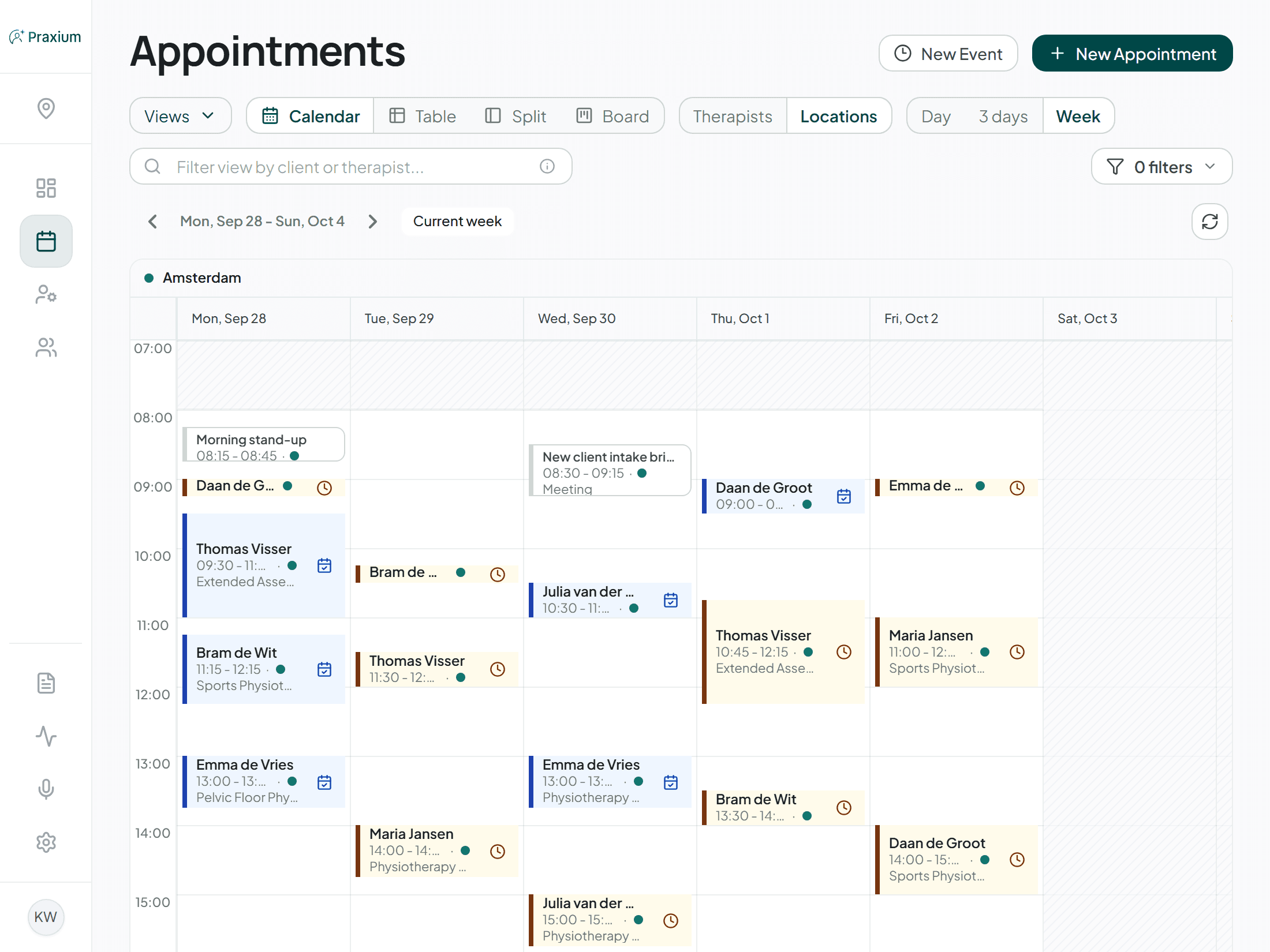
The Praxium appointment book, showing three days of bookings across two therapists

Patient management

Each patient record follows the structure your clinic needs.

  • Patients and documents in one record
  • 24 field types for fully customizable records, from text and dates to dropdowns, scales and files
  • Custom sections with drag-and-drop ordering
  • Patient portal: access to their own record and online booking
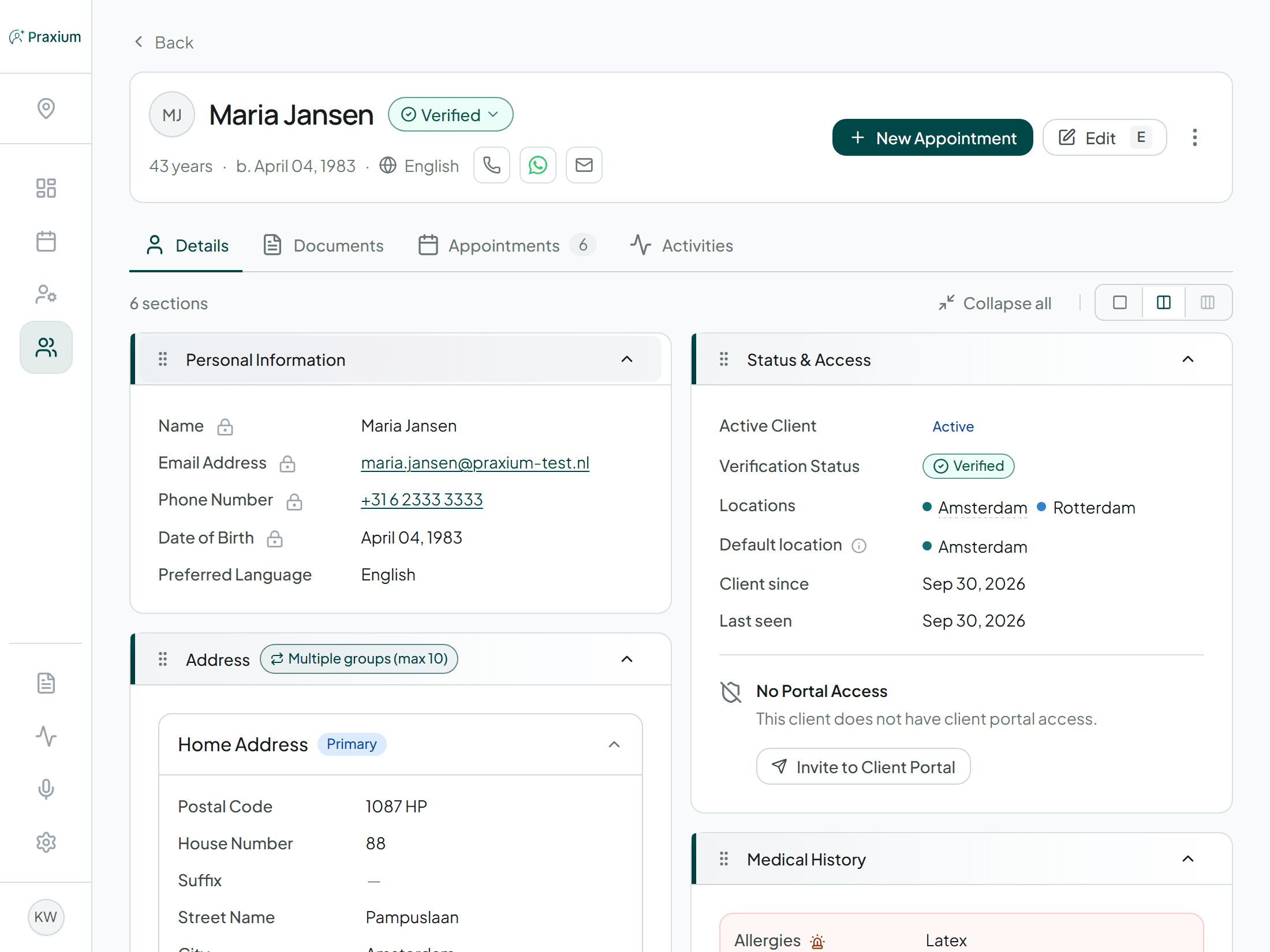
A patient record in Praxium showing seven configurable sections, including personal information, address, medical history and treatment episodes

Task management

Your day-to-day tasks stay in one place, with clear deadlines and progress from start to finish.

  • Built-in task tracker for day-to-day work
  • Clear ownership and deadlines
  • Notes, files and updates kept together
  • In-app notification when delegated work is completed
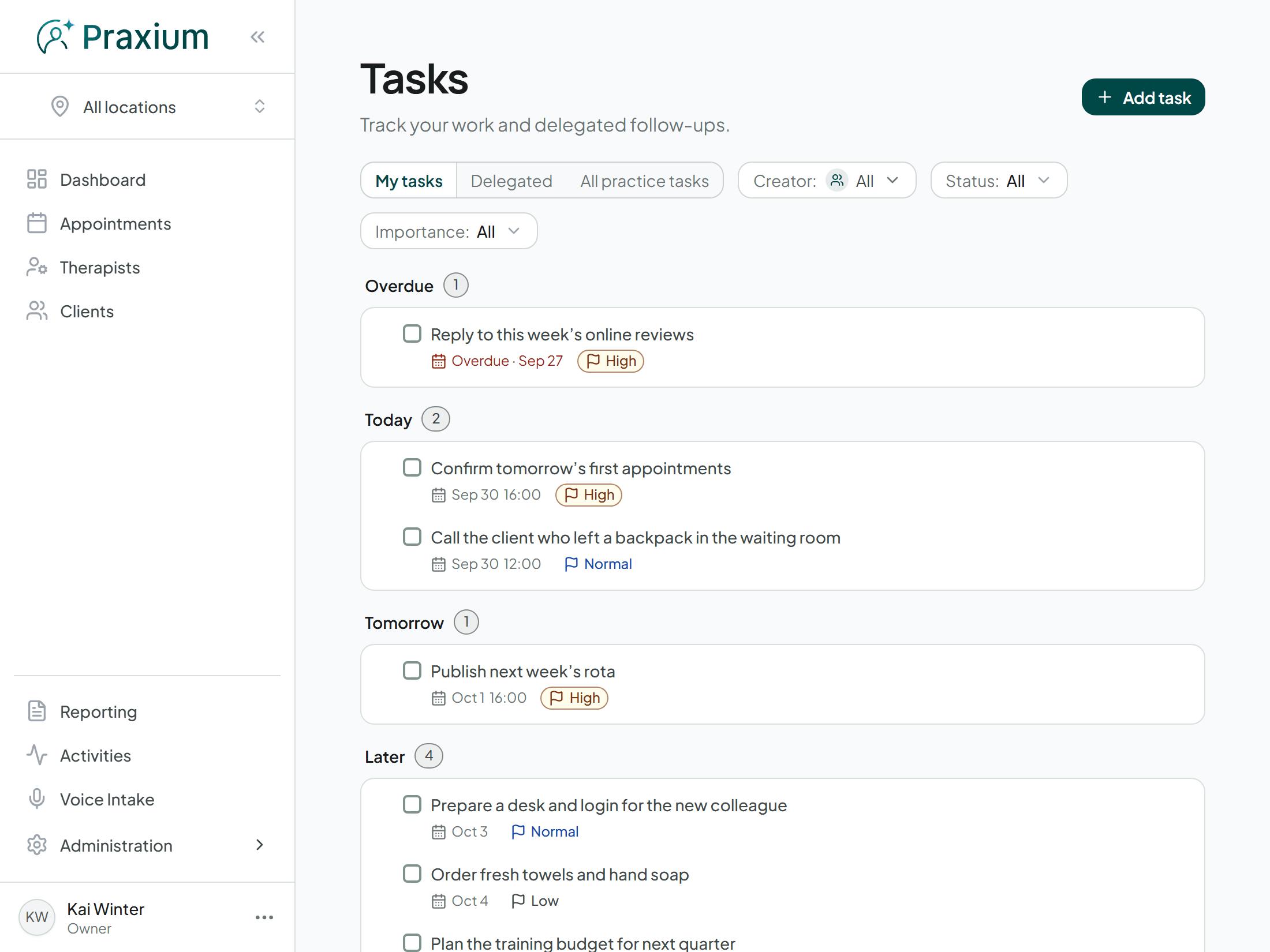
The Praxium tasks page, with overdue, upcoming and completed follow-ups

Your branding, your languages

Your clinic’s identity stays recognizable across every part of Praxium.

  • Your logo and colours in the admin portal
  • Matching branding in the patient portal and booking page
  • Branding overrides per location
  • Dutch and English included
  • Additional supported languages
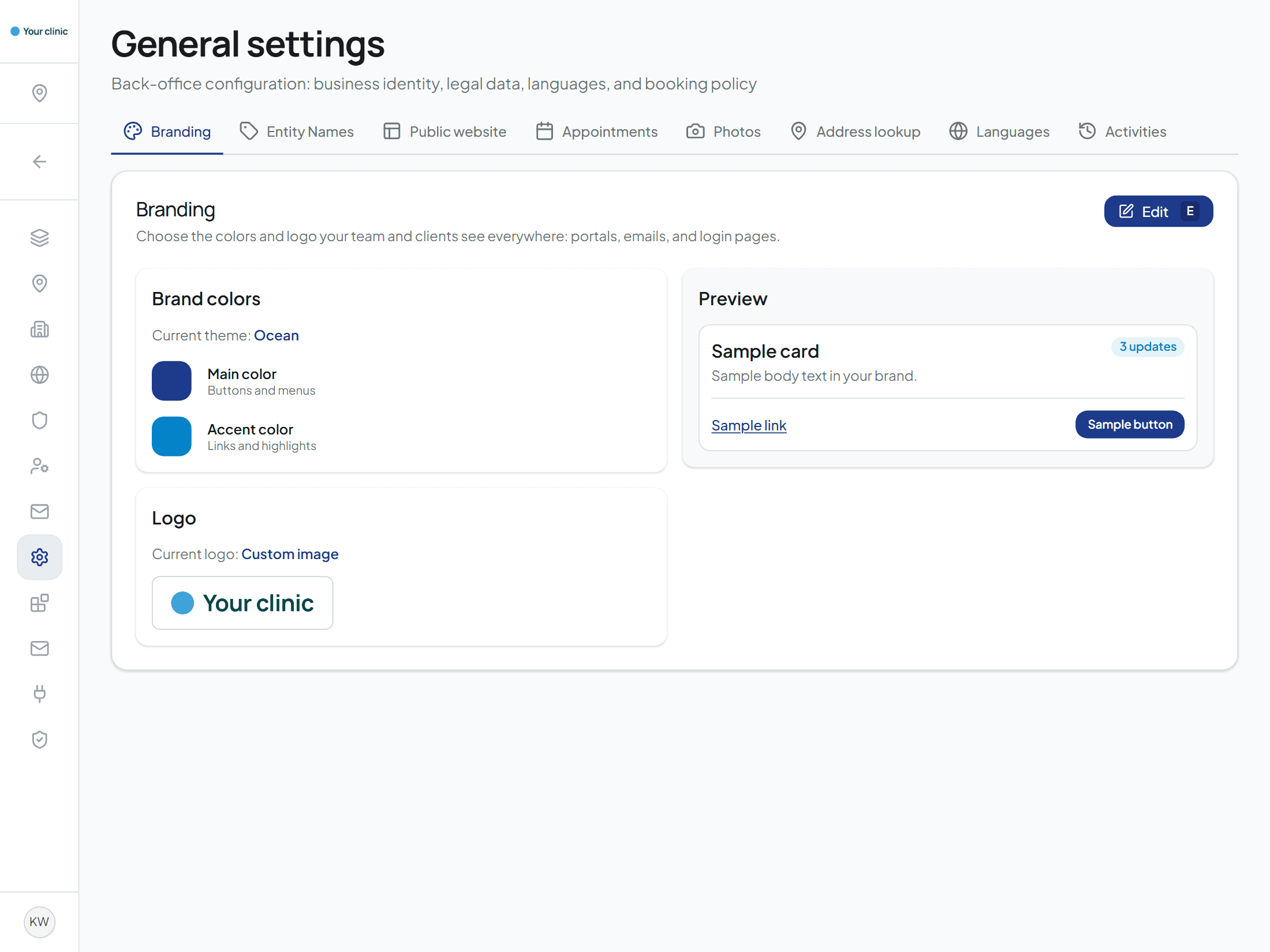
The Praxium configuration page, showing the clinic’s brand colours, logo and languages

Patient portal

Give patients access to their history, appointments and documents, choose what they can view or complete, and let them book appointments themselves.

Example: the patient portal home, with the next appointment and the ones after it

Upcoming

Next appointment

Monday 30 November

15:30–16:00

Dry needling

with Emma Wilson

Amsterdam

Keizersgracht 123

  • Thursday 10 December10:00–10:30PhysiotherapyEmma Wilson

See all upcoming appointments

Staff management

Assign roles and access to each staff member, invite colleagues by email and customize their profiles with the information your clinic needs.

Example: the staff list, with where each person works, their role and their admin access
Staff memberAdmin access
Emma Wilson
Amsterdam
Admin accessRole: Owner
James Carter
Utrecht
Admin accessRole: Physiotherapist
Sophie Brown
Amsterdam
Invitation sent

Service catalogue

Organize every service in one catalogue, add multiple options and set a different price for each location.

Example: the service catalogue, with the options of a service and a different price per location

Treatment(3)

Physiotherapy

  • Standard30 min · €55.00
  • Extended45 min · €75.00
    • Amsterdam€75.00
    • Utrecht€72.50

Dry needling

  • Standard30 min · €60.00

Multiple locations

Each location keeps its own setup, without adding complexity for a single-site clinic.

Example: the locations list, with each site’s address and booked capacity this week
LocationBooked capacity
AmsterdamKeizersgracht 123
82%

98h booked

22h unbooked

UtrechtOudegracht 45
65%

52h booked

28h unbooked

RotterdamCoolsingel 8
45%

18h booked

22h unbooked

Custom email sender

Connect your email provider, send messages from your own address and use a different sender for each location.

Example: the sending routes, with a default sender and a sender of their own for two locations

Sending routes

Default
Rotterdam
Ready

info@clinic.example · via Resend

AmsterdamReady

amsterdam@clinic.example

UtrechtReady

utrecht@clinic.example

Connect your website

Keep your website up to date with approved content from Praxium. Choose what to share for each location, with webhooks, an API and an SDK for custom integrations.

Example: what the website receives, two API access profiles with their locations and a webhook that keeps it current
API accessLocations
Team pageStaff · 6 fields
AmsterdamUtrecht
Website contentServices, FAQ · 14 fieldsAll locations
WebhooksStatus
Website rebuildStaff: created, updatedActive

AI notes

Beta

Let Praxium draft notes while you talk, review every filled field and its source, and approve everything before it reaches the record.

Example: an AI-assisted note in review, with the filled fields and the conversation they came from

AI-assisted form

Complaint
Lower back pain after lifting
AI filled
Onset
About two weeks ago
Verify
Speaker 2 · 0:07
My lower back hurts since I lifted a heavy box, about two weeks ago.

Security is the foundation

Non-negotiable. Everything else on this page can wait for the next release.

Field encryption

Protect sensitive patient data with field-by-field encryption, so a copied database remains unreadable.

Role-based access

Give each team member only the permissions their role needs and switch off access the moment someone leaves.

Two-step login

Add extra protection to every account with two-step login, optional or required for everyone.

Full audit logs

Every view of a patient record is logged, and Praxium keeps the logs for at least five years, as Dutch law requires.

Hosted in the EU

All patient data is kept in the EU. Same for the database and backups.

IP restriction

Limit admin access to your clinic’s network and verify sign-ins from elsewhere.

What’s next

What we are working on to make Praxium better.

Insurance claims via VECOZO

Planned

Submit claims and check a patient’s insurance from Praxium, with an established billing partner handling the VECOZO connection.

Invoicing and self-pay billing

Planned

Handle self-pay billing from invoice to payment without a separate billing tool.

See what’s new

Common questions

Only alongside what you already have. Praxium cannot submit declarations yet, but it is planned.

Yes. We handle the migration for you. It is not automated yet, so we transfer your existing records and make sure everything is ready before you switch.

No. We follow the practices described by those standards, but we are not certified yet. When that happens, the certificate will be on this page.

Yes. Praxium encrypts each sensitive field on its own. Everything that travels between your devices and Praxium is encrypted as well, and so is the connection between Praxium and its database. Each clinic’s data lives in its own section of the database, and the database itself blocks access from every other clinic. Your practice can also require two-step sign-in (MFA) for all staff, allow access only from IP addresses you trust and ask for an email code when someone signs in from a new network.

All data is stored and processed in the EU. Praxium’s infrastructure is located in Frankfurt, Paris and Dublin.

See what your clinic looks like in Praxium.

Your services, your patients, your own week. Ready in minutes.

Start free trial

Prefer to talk first? Get in touch